Rental - Property Management System Uganda | Renta Software
Renta is rental property management software: collect rent by MTN MoMo & Airtel Money, SMS reminders, landlord statements, tenant portal and accounting.

Renta: The Rental Property Management System That Collects Rent, Pays Landlords and Keeps the Books
Managing rental property in Uganda, Kenya, Tanzania, or Rwanda comes with its own daily headaches. Tenants pay by MTN Mobile Money, Airtel Money, cash and bank deposits. Some pay late, some pay for several months at once, and some pay a little more than the rent. Landlords want a clear statement every month, and the agency needs to know, at any moment, exactly who owes what.
Renta is a rental property management system built for this reality. It is web-based property management software that runs in any browser, on a computer or a phone, and it helps landlords, property managers and real estate agencies to collect rent automatically, remind tenants by SMS and WhatsApp, pay landlords correctly, and keep the accounts up to date without a full-time accountant.
In this guide, we walk through every module of Renta, step by step.
🖥️ Try it now: open the Renta live demo.
🎥 Prefer video? Watch the Renta video tutorial, and every module step by step on our YouTube channel: Emmadacomputerguy on YouTube.
Table of contents
- Who this property management software is for
- The dashboard
- Properties, blocks and units
- Tenants and leases
- Automatic invoices, payments and smart receipts
- Mobile money rent collection (MTN MoMo and Airtel Money)
- SMS and WhatsApp rent reminders
- Security deposits, discounts, services and utilities
- Expenses and broker commission
- Landlord statements and landlord portal
- Automatic accounting and financial statements
- Reports
- Tenant credit scores and city benchmarking
- Tenant portal and complaints
- Users, roles, audit log and settings
- Installation and requirements
- Frequently asked questions
1. Who this property management software is for
- Real estate agencies and property management companies that collect rent on behalf of many landlords and earn a management fee.
- Landlords who own their buildings and want rent, expenses and profit in one place.
- Owners of apartments, commercial plazas, shops, hostels and mixed-use buildings.
Renta has two "book modes": agency (rent belongs to the landlord and your income is the management fee) and owner (the rent is your own income). The accounting follows the mode you choose.
2. The dashboard
The Renta dashboard answers the questions every property manager asks each morning:
- Rent collected this month, compared with the same days last month.
- Collection rate: how much of the rent due has been collected.
- Outstanding rent and the number of tenants overdue.
- Occupancy: occupied and vacant units across all properties.
- Charts of rent billed vs collected (6 or 12 months) and money in vs money out.
- How tenants paid this month (bank, MTN MoMo, Airtel Money, cash).
- Property occupancy table, rent due in the next 14 days, best-paying tenants, security deposits held and cash and bank balances.
3. Properties, blocks and units
- Add a property with its city, address, type (residential, commercial or mixed) and landlord.
- Divide it into blocks (Block A, Block B…).
- Create many units at once: choose a prefix and a range, for example A1 to A10, with the rent and type of each unit. A preview shows the names before you save.
- Each unit is occupied, vacant or under maintenance, so nobody is moved into a unit that is being repaired.
4. Tenants and leases
Register a tenant with their phone number, national ID, occupation and next of kin, then move them into a vacant unit. The lease records:
- the start date and the agreed rent;
- the security deposit (with its own receipt);
- the broker who brought the tenant, and their commission (a percentage or a fixed amount).
When a tenant moves out, the lease is ended, and the deposit is settled in a clear order: deductions for damage (with a reason), then unpaid rent, then the balance is refunded.
5. Automatic invoices, payments and smart receipts
This is the heart of Renta's rent collection software.
- Monthly invoices are created automatically for every active lease.
- When money comes in, Renta pays the oldest unpaid month first.
- If a tenant pays for several months at once, the next months are filled in order.
- Overpayments are never lost: the extra is carried forward as credit for the next month.
- Partly paid months are marked, and the balance carries forward.
- The receipt shows the months paid as a range, for example "January – May 2026", with your company header, and can be printed or downloaded as PDF.
Before you save a payment, a preview shows exactly which months it will cover.
6. Mobile money rent collection (MTN MoMo and Airtel Money)
Renta collects rent through:
- the MTN MoMo API (direct),
- Flutterwave and Pesapal (MTN and Airtel Money).
Staff can send a payment prompt to the tenant's phone, and tenants can pay from the tenant portal. Every payment is verified with the gateway, matched to the right invoice and receipted automatically. The landlord and managers can be notified as soon as money arrives, and a demo simulator lets you test without real money.
7. SMS and WhatsApp rent reminders
Late rent is the biggest problem for any landlord. Renta sends automatic rent reminders:
- before the due date (for example, 3 days and 1 day before),
- on the due date,
- and after the due date while the rent is overdue (for example, after 3, 7 and 14 days).
Messages use editable templates with the tenant's name, amount, unit and due date. Renta works with Africa's Talking, EgoSMS, Twilio, Infobip or any SMS provider with an HTTP API, and with the WhatsApp Cloud API. Tenants also get a payment receipt message, and landlords can receive an SMS for every payment.
8. Security deposits, discounts, services and utilities
- Security deposits are tracked separately from rent, with receipts, and settled when the tenant leaves.
- Discounts can be granted on an invoice with a reason.
- Services and utilities (water, garbage, security, power) are charged and receipted separately from rent, with their own reports.
9. Expenses and broker commission
Record property expenses (repairs, cleaning, security, utilities) by category and property, and pay broker commission with a payout voucher. Expenses flow straight into landlord statements and the accounts.
10. Landlord statements and landlord portal
At the end of the month, a landlord statement is ready for every landlord: rent collected, your management fee, expenses paid, payouts already made and the balance due. It downloads as a branded PDF.
Landlords can also sign in and see their own properties, tenants, payments and statements, and nothing else.
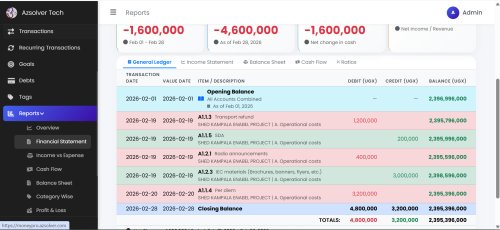
11. Automatic accounting and financial statements
Every receipt, expense, deposit, payout and service payment posts a double-entry journal automatically. Without an accountant, you get:
- Profit & Loss, Balance Sheet and Cash Flow statements;
- Trial Balance, Day Book and journal entries;
- a chart of accounts with a ledger for every account;
- bank accounts with deposits and live balances.
12. Reports
Renta includes the reports property managers use most: rent roll, arrears by age, collections, defaulters, upcoming payments, occupancy, expenses, payments by method and services. Every report exports to Excel, CSV, PDF and Print, with your company header.
13. Tenant credit scores and city benchmarking
- Every tenant gets a credit score from 300 to 850, based on how on time they have paid. It helps you decide who to trust with a new unit.
- Benchmarking compares your collection rate, on-time rate and occupancy with other properties in the same city (only totals, never names).
14. Tenant portal and complaints
Tenants sign in with their phone number to:
- see their balance and invoices,
- pay rent by mobile money,
- download their receipts,
- send and follow complaints (a leaking tap, a broken gate), with replies from the office.
15. Users, roles, audit log and settings
- Five roles, including administrator, property manager, accountant, landlord and tenant, each seeing only what they should.
- An audit log of every important change, and a trash where deleted records can be restored.
- Settings for the company profile and logo, currency, rent due day and grace period, document numbering, mobile money, SMS and WhatsApp, and the brand colour.
- Progressive Web App with dark mode, fully responsive on phones.
A month in a property agency running Renta
Here is how the modules work together over one rent cycle:
- 1st of the month: Renta creates the rent invoices for every active lease automatically.
- Before the due date: tenants receive an SMS or WhatsApp reminder with the amount and how to pay.
- Payments arrive: a tenant pays by MTN MoMo from the tenant portal; Renta verifies it, applies it to the oldest unpaid month, carries any extra forward, and sends a receipt message. Another tenant pays cash at the office; the accountant records it and prints the receipt.
- After the due date: overdue tenants get a polite overdue reminder, and the defaulters report shows who to call.
- During the month: a plumber is paid for a repair; the expense is recorded against the property, and the landlord sees it on their statement.
- Month end: every landlord gets a statement (rent collected, management fee, expenses, balance due), payouts are recorded, and the Profit and Loss shows the agency's own income.
No spreadsheet, no manual receipt book and no month-end reconciliation: the books were updated with every transaction.
Why landlords and agencies switch to Renta
- Collect more rent on time: automatic reminders before, on and after the due date.
- No more lost overpayments or disputes: every shilling is applied to a month and shown on the receipt.
- Happier landlords: clear monthly statements and their own login.
- Less work at the office: tenants check balances, pay and download receipts themselves.
- Know which tenants to trust: credit scores based on real payment history.
16. Installation and requirements
Renta installs with a web installer (server check, database, company and administrator) on cPanel shared hosting, a VPS or XAMPP.
| Requirement | Minimum |
|---|---|
| PHP | 8.2 or newer |
| Database | MySQL 5.7+ or MariaDB 10.4+ |
| Server | Apache (mod_rewrite) or Nginx, with HTTPS |
| Cron | One job every minute |
| Optional | MTN MoMo API, Flutterwave or Pesapal account; an SMS provider; WhatsApp Cloud API |
It ships with an installation guide, a user guide (PDF and in-app) and realistic demo data.
17. Frequently asked questions
What is a rental property management system?
It is software that manages properties, units, tenants, rent invoices, payments, landlord statements and accounts in one place. Renta adds mobile money collection and automatic SMS reminders.
Can tenants pay rent with MTN Mobile Money and Airtel Money?
Yes. Renta collects through the MTN MoMo API, Flutterwave and Pesapal, verifies every payment and issues the receipt automatically.
What happens when a tenant pays more than the rent?
The extra money is carried forward as credit for the next month, and the receipt shows exactly which months were paid.
Can landlords see their own statements?
Yes. Each landlord can sign in to see their own properties, tenants, payments and monthly statements.
Does Renta work in Kenya, Tanzania and Rwanda?
Yes. The currency, SMS provider and payment gateway are all set in Settings.
Do I need an accountant to use the accounting module?
No. Every transaction posts its journal automatically, so the Profit & Loss, Balance Sheet and Cash Flow are always up to date.
Collect rent on time, every month
Renta turns rent collection from a monthly struggle into a routine that runs by itself: invoices are created, tenants are reminded, mobile money is receipted, and landlords get their statements.
- 🖥️ Live demo: renta.azsolver.com
- 🎥 Watch the tutorials: Renta video tutorial · Emmadacomputerguy on YouTube
- 📚 Also in this series: LicenFlow – license management system and BRITOPOS – restaurant, bar and hotel POS
Renta is developed by Azsolver Technologies.
Share
What's Your Reaction?
 Like
0
 Dislike
0
 Love
0
 Funny
0
 Angry
0
 Sad
0
 Wow
0